
A faster path through a note
Start with guided steps, AI drafting and treatment context. Review the result in Practice Notes, with your drafts and work queue close at hand.
AN EHR THAT CONNECTS THE WORK OF THERAPY
AI-assisted notes, guided documentation, treatment progress and supervision in one connected clinical workflow. Built to help providers move through their day and supervisors focus their attention.
TAKE A LOOK AROUND
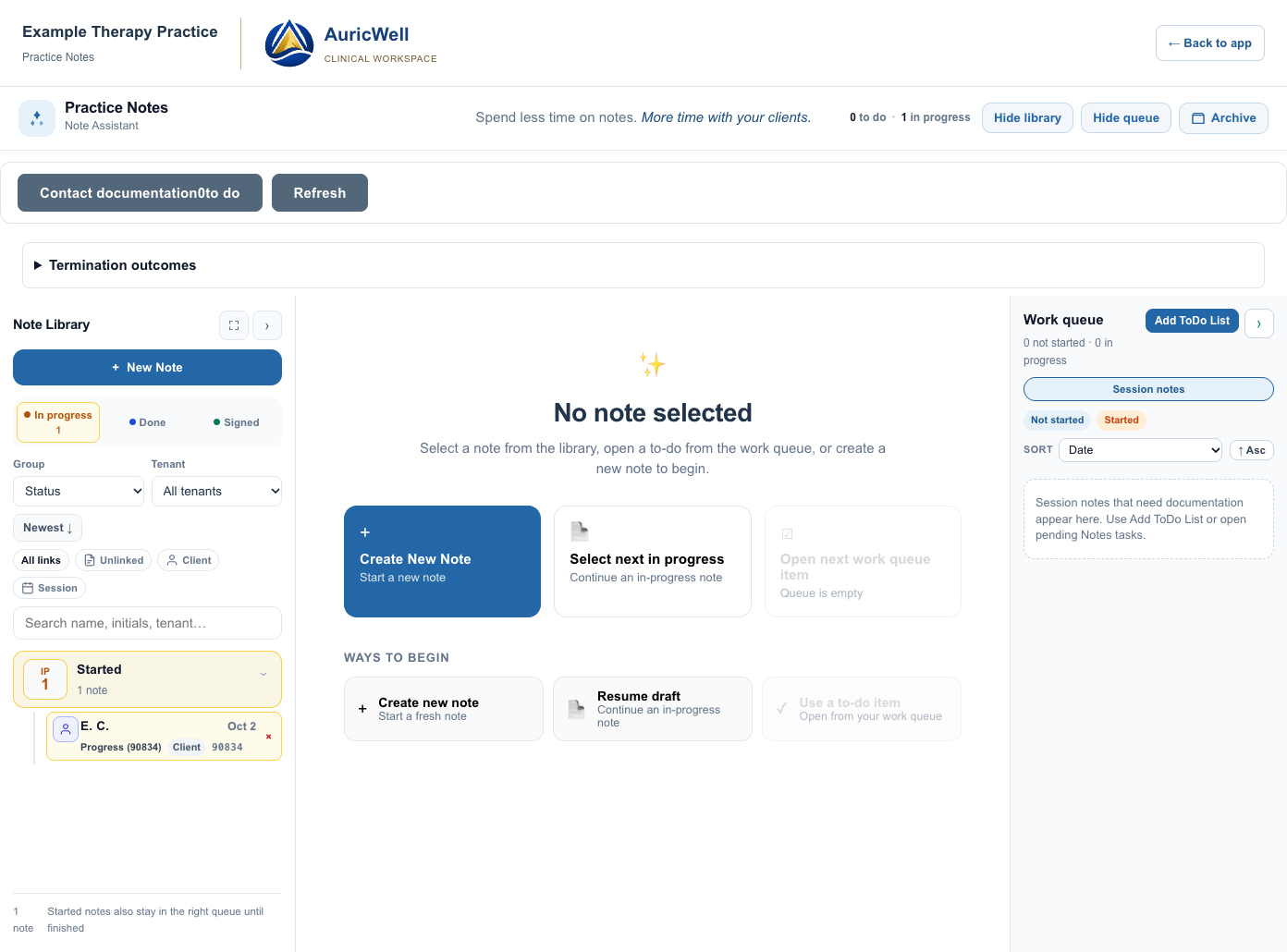
Try the same calendar, charts, provider directory, Practice Notes and billing components used in our app. Explore at your own pace—no account needed.
INTELLIGENCE IN THE EVERYDAY DETAILS
The value is in what connects: client check-ins inform the visit, treatment goals inform documentation, and the same clinical record supports review and billing.
Start with guided steps, AI drafting and treatment context. Review the result in Practice Notes, with your drafts and work queue close at hand.
Bring the note, outstanding work and review status together. Direct attention to the items that need it, with signatures governed by the document and practice workflow.
Connect service details, documentation and claim readiness. Surface missing requirements before the next step instead of relying on a second manual checklist.
BEFORE, DURING AND AFTER THE VISIT
Client and guardian access, enrollment, check-in and virtual care belong alongside the clinical work they support.
Separate guardian relationships and access to the clients they are authorized to support. Keep families connected to forms, appointments and practice communications.
Office kiosk check-in alerts the provider. Connection and progress feedback can make the next conversation more informed.
Private virtual offices, waiting-room music and interactive session tools are part of the wider connected care experience.
FROM FINDING A PROVIDER TO FINDING A TIME
Get to know a provider’s approach, explore their availability, and choose a time. Try the existing provider finder with fictional profiles and sample openings.
Loading the app’s provider cards…
YOUR PRACTICE. YOUR STARTING POINT.
Start a new practice or plan a move from your current EHR. We review what your practice needs to bring across.
Explore the approachBuild around your providers, services, forms and clinical standards. No historical migration files should stand in your way.
Review export formats, staff and payer records, billing history and clinical documents, then agree on a migration and reconciliation plan.
Import compatibility reviewed firstCOMPARE THE WAY YOU WORK
See how AuricWell, TherapyNotes and SimplePractice approach reminders, online requests, AI documentation, check-in and room scheduling—with links to official documentation.
FREQUENTLY ASKED QUESTIONS
From the first appointment to the signed note, here is what to expect. Read all questions →
The focus is the connected workflow: guided Practice Notes, treatment-goal history, supervision queues, configurable enrollment, provider availability and office check-in. Try the examples to see how those pieces fit your practice. We do not claim to be the only EHR with AI, reminders or online requests.
The shared scheduling workflow supports confirmation replies and shows client-confirmed status on the schedule. Practice settings govern reminder timing, templates and enabled email or text channels, subject to recipient preferences and consent. Confirm these integrations for your AuricWell rollout.
Yes—that is the new-practice onboarding path. It begins with the team, locations, services, fees, forms and agreements. Historical records and migration completion are not prerequisites. Customer rollout still requires the full operational workflow to be ready.
Begin with the exports available from your current system. Staff, clients, payers, clinical documents, billing history and opening balances need mapping, review and reconciliation before cutover. Compatibility is reviewed first; a direct connection to every EHR is not assumed.

Connected communications in AuricWell
Keep care conversations and the work around them connected. Messages by Conversa brings secure client messaging, email, care-team coordination, team texts, and polls into AuricWell.
Explore Conversa

Client and guardian conversations have a distinct secure space, authorized shared access, activity logging, and medical-record tracking. Email and text alerts never include the secure message.

Read, reply, organize threads, and work with attachments alongside your other communications. The sending organization and address remain clear.

Send team updates, collect votes or written answers, review replies, and share results. Superadmins, admins, and support manage these tools; intended recipients can respond.

Use internal messages, groups, channels, and reply threads to coordinate work. Client and guardian conversations use the secure-message channel.

Move between calls, voicemail, tickets, SMS, and announcements within the communications workspace, with the appropriate channel and sender identified.

Recognize organization identities, message types, unread states, and delivery history across AuricWell and Plot Twist HQ.
Secure messagesEmail Internal messagesTeam texts & polls
 Chat
Chat ThreadsChannels
 TicketsCalls
 Voicemail
 SMS
SMS Announcements
Conversa and AuricWell are wholly owned Plot Twist Co. products. Conversa is integrated with both AuricWell and Plot Twist HQ.
Available channels depend on your organization’s enabled features and integrations. Team texts and poll texts follow recipient consent and delivery preferences.
A LITTLE MORE CLARITY. A LITTLE MORE SPACE.